

The smarter way to capture your screen
A simple, powerful Mac app to capture your screen, enhance your screenshots, keep everything organized, and share polished visuals in seconds.






Everything you need, right at your fingertips
Capture, customize, organize, and share screenshots with a focused set of tools designed to make your everyday workflow faster and simpler.
Scroll Capture
Capture long webpages, documents, and conversations in one seamless screenshot without stitching multiple images together.


Screen Recording
Record your screen in high quality to create product demos, tutorials, walkthroughs, and quick videos with ease.
Background Tool
Transform simple screenshots into polished visuals with customizable backgrounds, colors, spacing, and subtle styling.


Text Recognition
Instantly detect and extract text from your screenshots, making it easy to copy, edit, search, and reuse important information.
Your screenshots, your workflow
Everything you need to capture, manage, and work with screenshots faster. Built for a seamless Mac experience that keeps your most important visuals always within reach.
Instant Search
Find any screenshot in seconds with powerful search that keeps your entire capture history easy to navigate.
Auto Organization
Keep your captures neatly organized with folders, tags, and smart sorting that fits the way you work.
Window Capture
Capture a specific app window cleanly without worrying about cropping or manually selecting the perfect area.
Screenshot History
Access your recent captures anytime and quickly revisit screenshots from your previous work.
Keyboard Shortcuts
Capture, edit, and access your tools instantly with customizable shortcuts designed for a faster workflow.
Cloud Sync
Keep your screenshots available across your devices with automatic syncing, so your captures are always within reach.
Built for the way you work
Whether you’re creating product demos, sharing ideas, documenting bugs, or saving inspiration, make every screenshot more useful with tools designed for everyday workflows.

Bug Reporting
Capture the exact moment a bug appears, annotate it instantly, and share a link directly to your Jira ticket — no more vague bug descriptions.
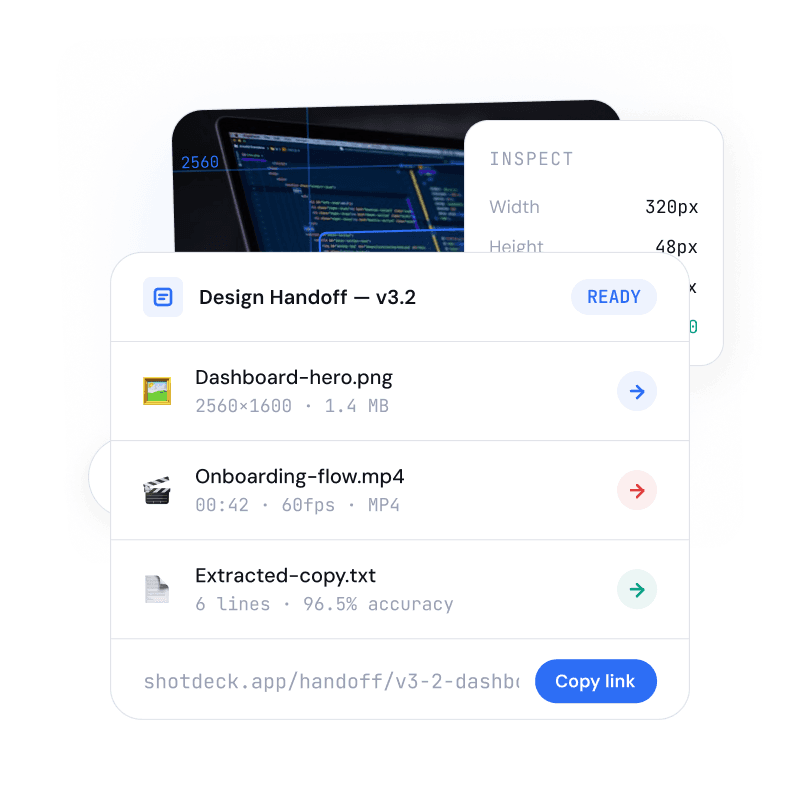
Design Handoff
Bundle screenshots, recordings, and extracted copy into a single shareable link. Your team gets everything they need — specs, assets, and context.
Simple Pricing
Choose the plan that fits your team today, with the flexibility to scale as your data and business grow
Starter Plan
Free
No Credit Card required
Full-screen and area capture
Save up to 100 screenshots
Instant local search
Custom keyboard shortcuts
Pro Plan
$9/mo
Or 199$ / Year (20% off)
Unlimited screenshot history
Smart folders and tags
Clean window capture
Automatic cloud sync
Business Plan
$19/mo
Or 299$ / Year (20% off)
Everything in Pro
Shared team capture spaces
Sync across every device
Priority support
Loved by people who move fast
See how creators, designers, and teams use the app to capture ideas, communicate clearly, and turn screenshots into polished, shareable visuals.

Jacob Green
@joacobgreen
“I can find a screenshot from weeks ago in seconds. It’s become the fastest way to recover context before a design review.”

Sara Mitchell
@sarah_micthcerll
“The window capture feature is exactly what I needed for clean product documentation—no more cropping screenshots by hand.”

David Chen
@david_chen
“Smart folders keep every bug report and reference image organized without adding another tool to my workflow.”

James Walker
@james_walker
“My screenshot history is now a searchable project archive. I never lose a useful reference after a busy sprint.”

Priya Kapoor
@prya_kapoor
“Keyboard shortcuts make capturing a moment effortless. I can save exactly what I need without breaking focus.”

Michael Thompson
@michael_thompson
“Cloud sync means the screenshots I grab on my laptop are ready when I open the app on another device.”
Frequently asked questions
Everything you need to know about capturing, organizing, and finding screenshots.
What can I capture with the app?
How does screenshot search work?
Can I organize screenshots into folders?
Does the app sync across devices?
Can I use keyboard shortcuts?
Capture. Create. Share.
A faster, simpler way to turn anything on your screen into polished visuals. Capture your next screenshot and make it yours.
